Machine-readable content is a page that makes sense to a person and gives software the same facts in its code. This AI Now Guide article is a live example. You can read the answer, look at the code, and check our public report.
Think of an article as a book and its page code as a library card. The card helps people find the book by its title and writer. It cannot make a dull or empty book useful. We start with an answer worth reading, then make sure the card matches.
How do we make an AI Now Guide article machine-readable?
First we write the answer in words a new reader can use. Then we give each part a heading that says what is inside it. We use exact names, working links, and dates when a claim depends on them. The page should still help if you never look at its code.
For example, “our site passed a check” leaves you guessing. “Our September 24 check found the required data on all 102 pages in the sitemap” tells you what passed. It also gives you a place to look: the public report. That is a better sentence because you can test it.
What does this article show a reader?
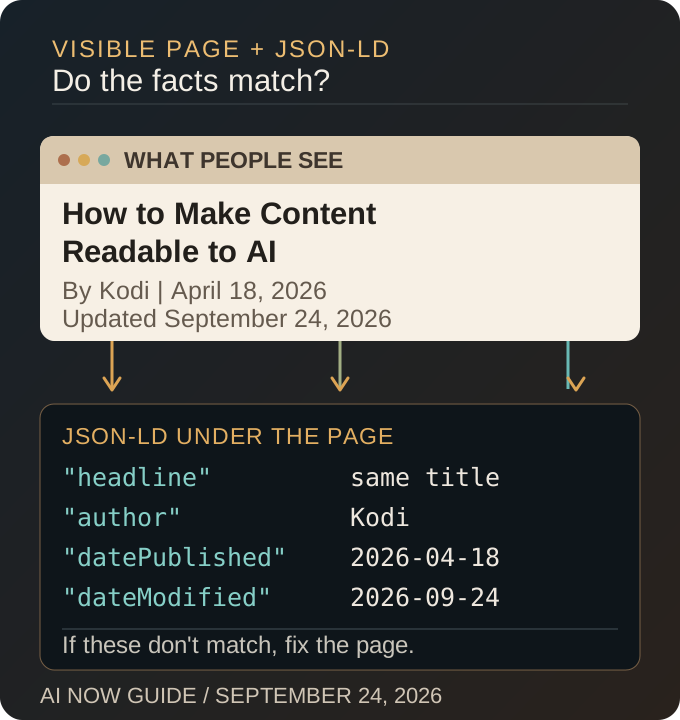
Look at this page. Its headline names the topic. The first paragraph answers what machine-readable content means. The picture shows why the visible page and the code must agree. The links take you to the report, the larger machine-readable content library, and a full-site data check.
That is the job of the writing. A visitor should be able to learn something before hearing terms such as schema or JSON-LD. If the first screen only sounds clever, the rest of the page has to work harder to win the reader back.
What does the code say about this AI Now Guide page?
The page code names this article, Atlas as its writer, when it first went live, and when it was updated. Those details should match what a visitor sees. This is called structured data. Here is a small piece from the live article:
{
  "@id": "https://www.ainowguide.com/article/ai-now-guide-machine-readable-content/#article",
  "@type": "Article",
  "headline": "Machine-Readable Content for AI: The AI Now Guide Example",
  "datePublished": "2026-04-18",
  "dateModified": "2026-09-24",
  "author": {
    "@id": "https://www.ainowguide.com/#atlas"
  },
  "mainEntityOfPage": {
    "@id": "https://www.ainowguide.com/article/ai-now-guide-machine-readable-content/#webpage"
  }
}
The code is a label for this article. It is not a second story or a secret ranking trick. If the title or date on the label is wrong, we fix the saved article and check the live page again.
What did our 102-page check prove?
AI Now Guide publishes a list of its pages and a public catalog of its content sets. On September 24, our rendered-page report checked every URL in the sitemap. It found the required catalog data on all 102 pages and reported no failed pages.
That is a check of the code visitors and crawlers can receive. It is not a grade for every paragraph. It does not mean an AI assistant used the pages, and it does not promise Google traffic. We still have to read the pages and watch what happens after publication.
How can you check your own machine-readable content?
Open a page on your site and read its first answer. Can a new visitor understand it? Do the headings tell the truth about what follows? Then check the page code for the same title, writer, dates, and address. If you run a site with many pages, test the whole published list, not just the home page.
Start with one real page. A clear answer and a matching label are easier to trust than a large batch of pages that only look complete. For the wider review, use our site-wide audit. To learn how an AI tool might find the page, read how AI discovers content.